NEC calculators, inside Revit
A SYMATEQ tab in Revit with an NEC Article 220 service load calculator and twelve NEC sizing calculators, so a load calculation ends as a table on a sheet, not as a number copied out of a browser.
In shortThe SYMATEQ Revit add-in puts an NEC Article 220 service load calculator and twelve NEC sizing calculators on a ribbon tab in Autodesk Revit 2025 and 2026, so a load calculation ends as a table on a sheet. It installs with a standard Windows installer, makes no network calls and collects no data. It is available on request and is not on the Autodesk App Store yet. It is a separate product from the Engineering Hub, the browser tool for state code lookup and calculators.
One ribbon tab, thirteen tools
Each tool is its own button with its own window, and the window stays open while you keep working in the model.
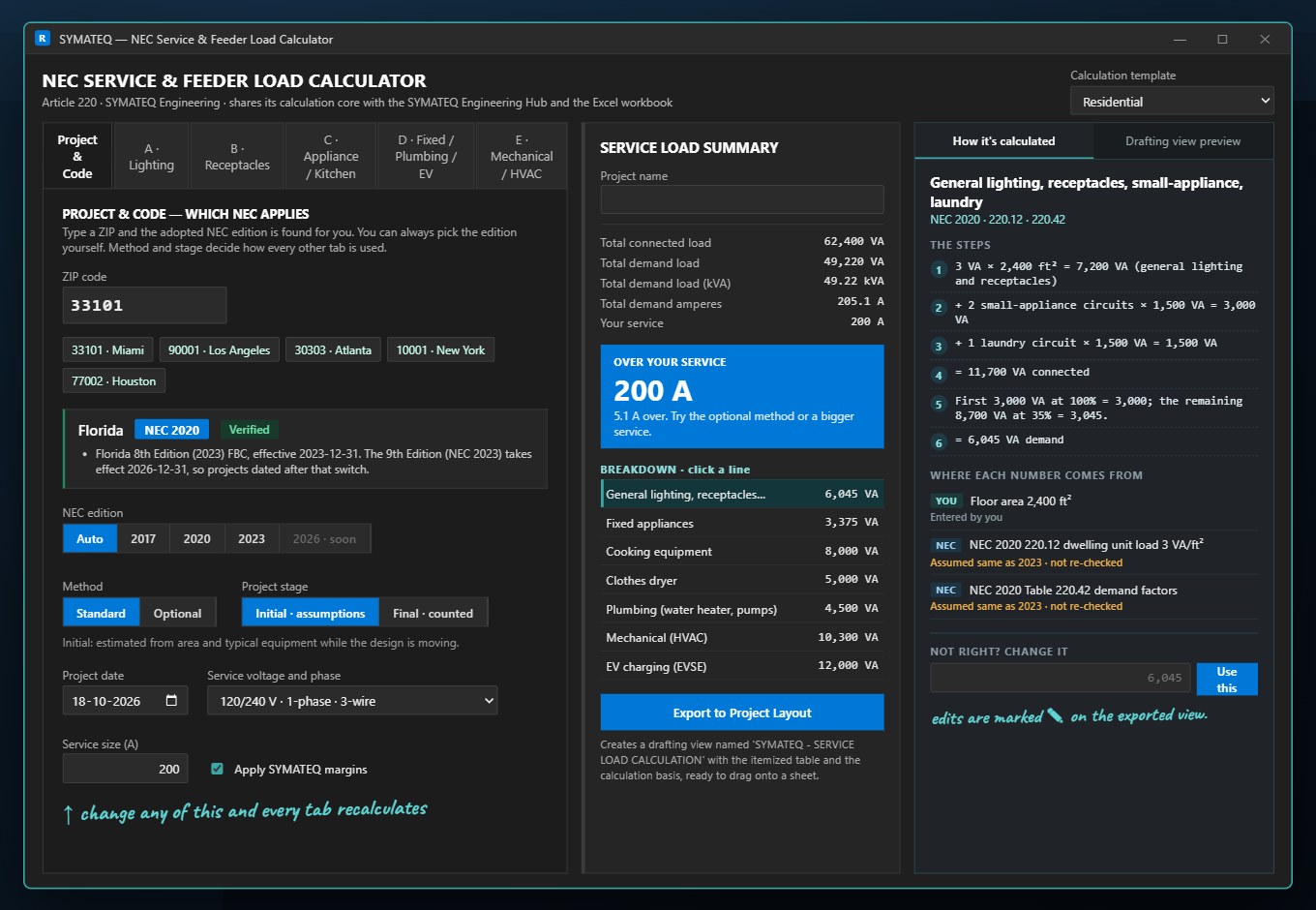
Service Load Calculator
- NEC Article 220 with residential and commercial templates
- One editable grid per load category: lighting, receptacles, appliance and kitchen, fixed and specialty, mechanical and HVAC
- Live totals, demand factors and a recommended service size
- Finds the NEC edition adopted for the project ZIP code
- Writes the finished table into a Revit drafting view
Twelve NEC calculators
- Ampacity and wire sizing, conduit fill, voltage drop
- Breakers and OCPD, motor and HVAC MCA/MOCP, transformers
- Fault current, grounding and bonding, arc flash input check
- Solar PV and EV charging, generator sizing, lighting fixture count
Inside Revit
- A SYMATEQ tab with five panels: Load Calculations, Sizing and Protection, Motors and Power, Safety and Grounding, Renewable and Lighting
- Revit 2025 and 2026, 64-bit
- A standard Windows installer that places the add-in in Autodesk's ApplicationPlugins folder
- No change to your project or template
What comes out
A table on a sheet, not a number in a browser
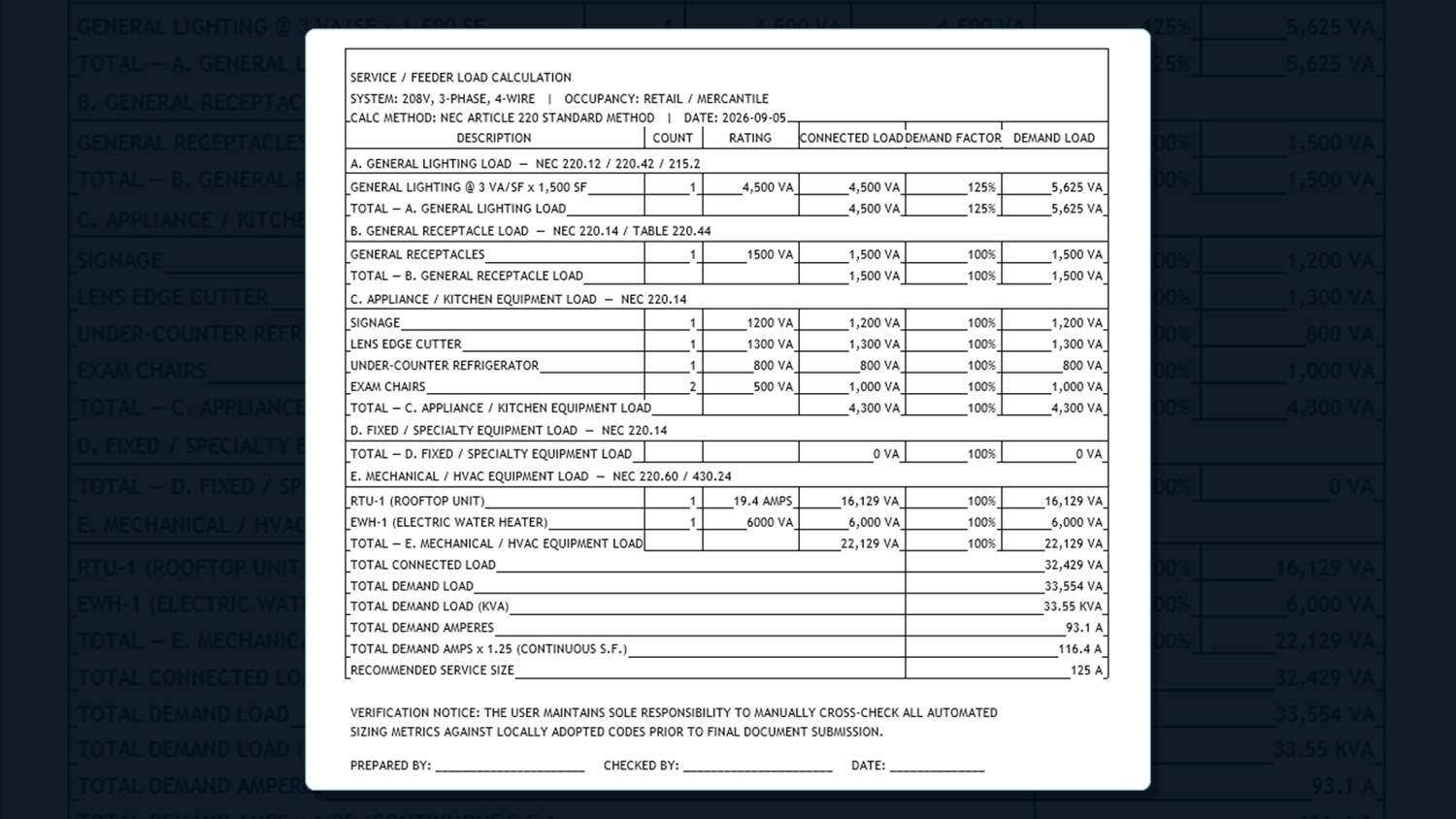
The Service Load Calculator itemizes every load, shows the demand factor and the demand on each line, and totals the service. One button writes that table into a Revit drafting view, ready to drag onto a sheet, so the calculation travels with the drawings and your engineer can follow every line.
- Connected load, demand factor and demand load per line
- Total demand in VA and amperes, and the recommended service size
- A verification notice and space for prepared by, checked by and date
Thirteen tools, each with a guide
What it calculates, the code basis, typical inputs and the limits, one page per tool in the Engineering Hub.
Service Load Calculator
NEC Article 220, residential and commercial templates
Read the guideAmpacity and wire sizing
Table 310.16 with temperature and bundling adjustments
Read the guideConduit fill
NEC Chapter 9, Tables 1 and 5
Read the guideVoltage drop
K-constant method, with the NEC 210.19(A) and 215.2(A)(3) notes
Read the guideBreakers and OCPD sizing
NEC 240.4 and 240.6(A), disconnect sizing
Read the guideMotor and HVAC MCA/MOCP
Table 430.250 and Articles 430 and 440
Read the guideTransformer sizing
Standard kVA sizes, 125% continuous load
Read the guideFault current and Isc
Infinite-bus and point-to-point methods
Read the guideGrounding and bonding
NEC Tables 250.122 and 250.66
Read the guideSolar PV and EV charging
NEC 705.12(B)(3)(2), 690.8 and Article 625
Read the guideGenerator sizing
NEC 700.4 and 701.4 capacity check
Read the guideLighting fixture count
IES zonal-cavity lumen method
Read the guideArc flash
IEEE 1584-2018, input check only
Read the guideInstall
What you need and how it starts
| Autodesk Revit | 2025 or 2026, 64-bit |
| Operating system | A Windows release supported by your Revit version |
| Runtime | .NET 8, installed with Revit 2025 and later |
| Network | None. The add-in makes no network calls and collects no data. |
| Installer | A Windows installer (.msi). Close Revit first. |
- Start Revit and open or create a project.
- Open the SYMATEQ tab on the ribbon.
- Click any of the thirteen buttons. Each opens its own calculator window.
- Leave a window open and keep working in the model.
Status
Where it stands today
- Available directly from us on request. It is not on the Autodesk App Store yet.
- The NEC calculators have been run in Revit 2026. Revit 2025 builds from the same project.
- The Service Load Calculator has been run end to end in Revit 2026 for one scenario, a retail space on the commercial template. Cross-check a full calculation against a known-good source before you rely on it for a job.
- Arc flash checks the inputs for an IEEE 1584 study. The incident energy itself comes from your licensed engine or a vendor study.
- The calculators apply the base NEC tables and no state amendments. Check the adopted edition for the project first.
Questions about the Revit add-in
What does the SYMATEQ Revit add-in do?
It adds a SYMATEQ tab to Revit with an NEC Article 220 service and feeder load calculator and twelve NEC sizing calculators: ampacity and wire sizing, conduit fill, voltage drop, breakers and OCPD, motor and HVAC MCA/MOCP, transformers, fault current, grounding and bonding, solar PV and EV charging, generator sizing and lighting fixture count, plus an input check for arc flash studies. The service load calculator can write its table into a Revit drafting view.
Which Revit versions does it support?
Revit 2025 and 2026, 64-bit, on Windows. It runs on .NET 8, which comes with Revit 2025 and later. Revit 2024 and earlier run on an older .NET and are not supported. It has been run in Revit 2026, and Revit 2025 builds from the same project.
How do I get it?
Ask for the current build through the contact page and tell us your Revit version. It is available directly from us and is not on the Autodesk App Store yet.
How is it different from the Engineering Hub?
The Engineering Hub is a website: you look up the adopted NEC and energy-code edition for a state and run calculators in the browser. The Revit add-in is a separate product that runs inside Revit and puts the result into the model as a drafting view. They share the same calculation core.
Does it send my project data anywhere?
No. The add-in makes no network calls and collects no data. Your calculations stay in your Revit session and in the drafting views you create.
Do the calculators follow my state's NEC edition and amendments?
The calculators apply the base NEC tables and do not apply state amendments. Check the edition and amendments for the project first, for example with the State Code Lookup in the Engineering Hub.
Does the add-in replace my engineer's review?
No. The calculations are engineering aids and do not replace review by a licensed professional engineer or confirmation with the authority having jurisdiction.
Related
Autodesk and Revit are registered trademarks of Autodesk, Inc. SYMATEQ is not affiliated with, endorsed by, or sponsored by Autodesk, Inc. SYMATEQ Electrical Calculators is an independent add-in for Autodesk Revit. Calculations are engineering aids and do not replace review by a licensed professional engineer or confirmation with the authority having jurisdiction.