Revit support
Models, sheets and schedules built in your template, and an add-in that brings NEC calculators into Revit.
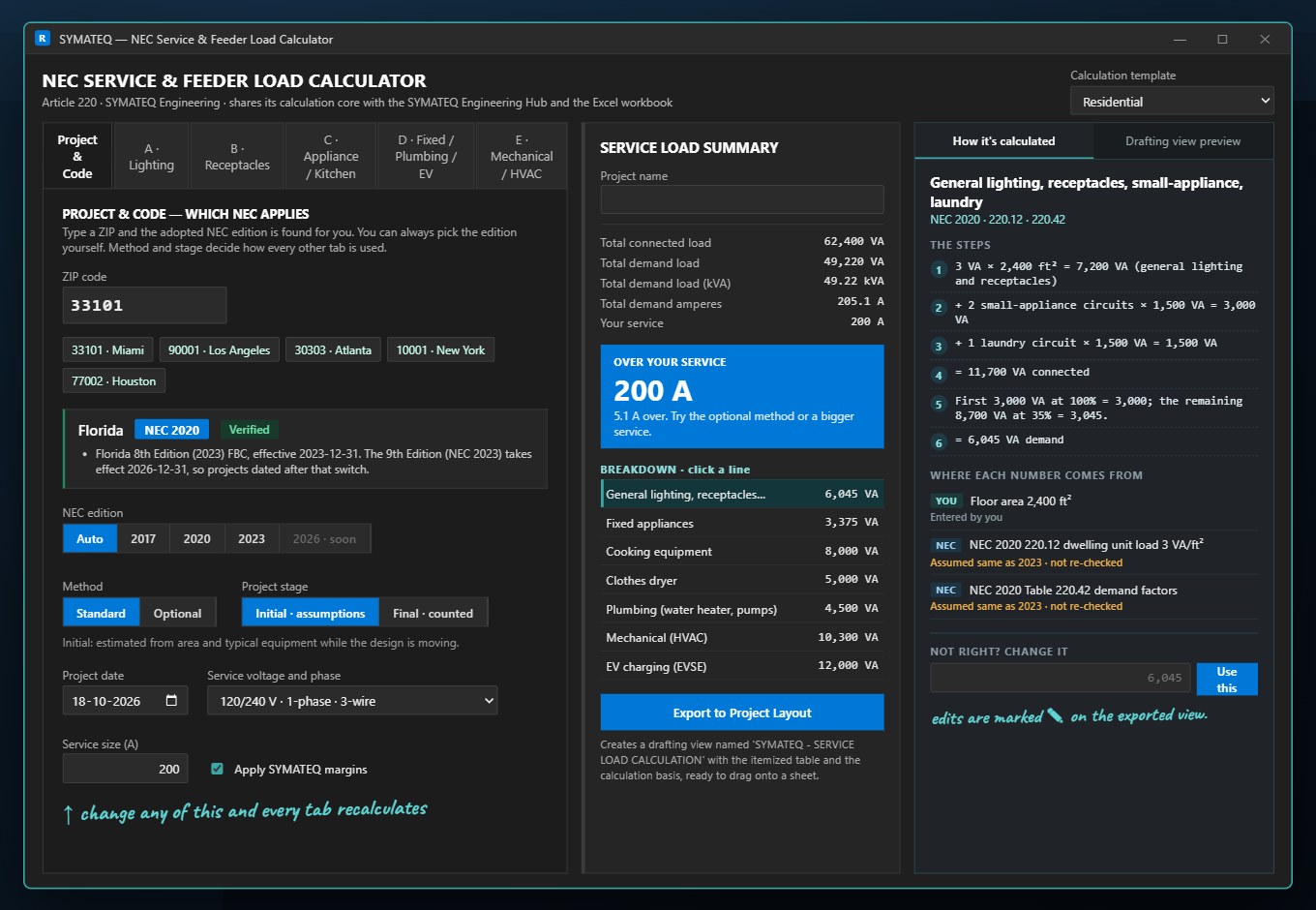
In shortSYMATEQ supports Revit users by building MEP models, sheets and schedules in your template, coordinating the trades in Navisworks, and offering an add-in with an NEC Article 220 service load calculator and twelve NEC sizing calculators inside Revit 2025 and 2026.
Who this is for
This page is for teams that work in Revit and want the MEP side modeled in their own template, families and naming rules, or want calculators inside the model.
What we do
- Revit electrical, mechanical and plumbing models in your template
- Sheets and schedules that come out of the model
- Clash detection and coordination in Navisworks
- Scan-to-BIM and as-built models
- The SYMATEQ Revit add-in, with NEC calculators in a Revit tab
What you send
- Your Revit template, families and naming rules
- The architectural and structural models
- Your BIM requirements, if the project has them
What you get
- A coordinated MEP model
- Sheets and schedules in your template
- A date and a price before work starts
Where it is offered
What we prepare depends on your region. Each region has its own support page.
| Every region | Revit modeling is offered in every region we work in. The add-in requires Autodesk Revit 2025 or 2026 on Windows and is available on request. |
How a job runs
Discovery and consultation
A short conversation about the project, the deadline, the codes and what matters most to you. No obligation.
Scope and onboarding
You get a clear scope, timeline and price. We sign an NDA if you need one, set up secure file transfer and take on your Revit and CAD templates and layer standards.
Engineering and modeling
We do the design assist, calculations, drawings and Revit models, built to the codes of your region.
Coordination and QA/QC
We coordinate the trades in Navisworks and check the set against a QC list before it leaves us.
Delivery and support
You get clean, coordinated, permit-ready sheets on the agreed date, with quick turnaround on revisions.
Questions about revit support
Which Revit versions do you work in?
We work in the version your project uses. The add-in supports Autodesk Revit 2025 and 2026 on Windows.
Where is the add-in?
It is available on request, and it is not on the Autodesk App Store yet. The add-in page has the details.
Related support
Drafting support
Plans, risers, schedules and details in Revit or AutoCAD, in your title blocks, layers and standards.
OpenCAD support
Drawings and details in AutoCAD, in your title blocks, layers and standards.
OpenBluebeam support
Send your Bluebeam markups. We return revised drawings and models.
OpenLarge project support
Large projects need one coordinated model and a clear date for every package. We agree both before work starts.
OpenReviewed by the SYMATEQ team. Last reviewed: 16 November 2026